
The original Rive React Native SDK was built on React Native's module APIs, which limited what it could express. Rive's object model is full of things you'd want to hold and pass around in JS: files, view models, properties, but React Native's module layer - classic NativeModules and their TurboModule successors alike - models modules, not objects, so it all got flattened into one view. We rebuilt the SDK on Nitro Modules, and not just because Nitro is known to be fast. Its real value here is letting us express a natural API for Rive's domain - and that API turns out to drive performance gains of its own.
What is Rive?
Rive is a tool for building interactive graphics, often described as a modern successor to Flash. Designers, animators, and developers work in one place: you design and animate in Rive's editor, add interactivity with state machines, and what you build is what ships: the same .riv file runs through a native runtime on web, React Native, Flutter, iOS, Android, Unity, and Unreal. Unlike playback-only formats, a Rive file reacts to input and to your app's data at runtime, and that data lives in an object model of files, artboards, view models, and typed properties.
TurboModules vs Nitro, at a glance
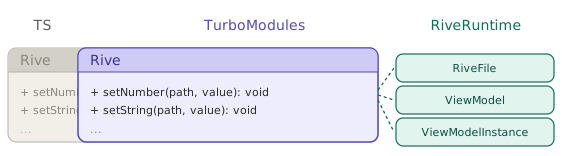
One clarification up front: the legacy SDK actually predates TurboModules - it's built on their classic-bridge predecessors, a ViewManager that owns the Rive view and its imperative commands plus a few NativeModules (renderer config, state-machine queries, events). But TurboModules keep the same shape - a singleton module with a flat list of methods - so a TurboModule port would have this same architecture, and everything in this comparison applies to both.
Legacy: Rive is a single God object: the whole API behind one view.
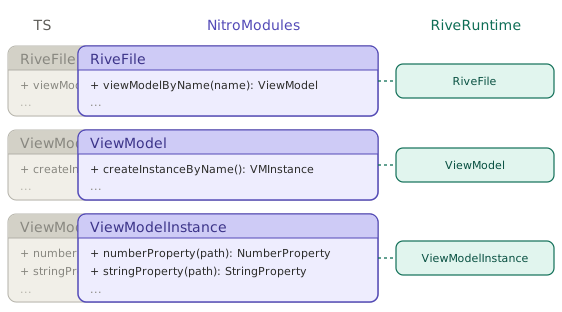
Nitro: exposes the full object model as separate, typed classes.
Challenges with TurboModules
TurboModules are great at what they're for: calling native functions from JS. But Rive isn't a bag of functions, it's a suite of classes that create interconnected objects: files, view models, and typed properties you hold and pass.
TurboModules are singletons, not objects. A TurboModule is one shared instance with a flat list of methods. It doesn't directly support objects, native resources with their own lifetime and instance methods, that you can hold and pass to JS. So RiveFile can't be a thing you hold: every call has to re-identify which file, view model, and property by string and id.
Native resources only live inside views. The view is RN's one abstraction with real identity and lifecycle, so the legacy SDK stuffs all native state into it and reaches it by string-based RPC. The setNumber(path, value) setter is, under the hood, a ViewManager command dispatched at the view:
// rive-react-native, src/Rive.tsx
setNumber(path: string, value: number) {
  UIManager.dispatchViewManagerCommand(
    findNodeHandle(riveRef.current),
    ViewManagerMethod.setNumberPropertyValue,
    [path, value]
  );
}
dispatchViewManagerCommand is the classic ViewManager API, but a new-architecture port would look just the same: the Fabric equivalent is a codegen'd command with the same signature - Commands.setNumberPropertyValue(viewRef, path, value) - and a TurboModule method would take the same view handle and string path as arguments. Either way, it's a flat, write-only call that re-identifies its target by handle and path - the new architecture makes the call itself much cheaper (direct JSI instead of the batched bridge; numbers in Nitro Modules), but doesn't change its shape.
A resource that isn't a view like RiveFile shared across screens means hand-rolling an id-to-object map with no type safety and no lifecycle. And since Hermes has no FinalizationRegistry, there's no GC hook to free it when its JS handle goes away.
Swift support requires Objective-C boilerplate. Rive's iOS runtime is Swift-first, so this is the language you actually want to write against. But for TurboModules every Swift class has to be re-exported to React Native through Objective-C: RiveReactNativeViewManager.swift needs a companion .m full of RCT_EXTERN_METHOD macros, @objc annotations scattered through the Swift, and a bridging header to wire it together. It's boilerplate you maintain by hand, and it pulls Objective-C back into a codebase that otherwise wraps a pure Swift SDK.
Nitro Modules
Nitro lets a JavaScript object be implemented in C++, Swift, or Kotlin instead of JS. Those are HybridObjects, native objects that behave like ordinary JS objects: they hold their own state, expose methods, and you can create, hold, and pass them around. That's the one capability this rewrite hinges on.
Two things come along for free that matter for Rive: the API is typed from a single TypeScript spec and implemented in Swift directly (no Objective-C bridging), and because HybridObjects sit on jsi::NativeState, the JS garbage collector can reclaim them, which is what lets a RiveFile be freed when its handle goes away.
And it's fast: a Nitro call is a direct JSI invocation with no bridge serialization. We measured the raw call overhead ourselves - the same trivial methods implemented both ways, 100,000 calls each on an iPhone 13 mini (release build): a Nitro HybridObject method averages ~0.3-0.4 µs per call, a codegen'd new-architecture TurboModule ~1.5 µs. So TurboModules already cut call cost by an order of magnitude versus the legacy bridge's ~21 µs per write - and Nitro is another ~4-5× faster still. (The numbers that matter for Rive come later, in Results.)
Rive React Native with Nitro
With Nitro, RiveFile becomes a HybridObject - a real native object you create, hold, and pass around, instead of an opaque id hidden behind module functions.
In the legacy SDK, loading is implicit - you hand the view a URL and it does the rest:
<Rive url="https://rive.app/vehicles.riv" />
For a one-off animation that's hard to beat. But the file is created and owned inside the view, so you can't hold it, reuse it, or even tell whether it loaded.
With Nitro you load the file yourself. The useRiveFile hook takes a source - a URL, a bundled .riv, or raw bytes - and hands back the file plus its loading and error state:
const { riveFile, isLoading, error } = useRiveFile(
  "https://rive.app/vehicles.riv"
);

if (isLoading) return <ActivityIndicator />;
if (error) return <Text>Couldn't load animation</Text>;

return <RiveView file={riveFile} />;
A few more lines, for the simple case the old way is genuinely simpler. But you immediately get what the one-liner couldn't express: a spinner while the file loads, a fallback when it fails, and a riveFile you can hold and pass instead of state trapped in the view. That last part unlocks patterns the legacy SDK couldn't:
- Preload a file ahead of time, before any view mounts, then render instantly.
- Share one loaded file across multiple
RiveViews: parse once, render many times.
Here's what those two patterns buy on screen - the same app opening a screen with four Rive views of one 2.9 MB file (iPhone 13 mini, release build). Legacy has neither preload nor file sharing, so it parses the file four times and takes ~500 ms; Nitro preloads once, shares the file, and shows all four in ~58 ms:
Memory: deterministic, with GC fallback. Standalone objects raise a question that the old view lifecycle answered for free: who frees the file? Nitro gives you both halves.
Our hooks dispose eagerly. useRiveFile loads the file in an effect and calls dispose() on cleanup, so the native file is released the moment the component unmounts or its source changes - tied to React's lifecycle, not the GC.
And if you skip the hooks and create a RiveFile by hand, you're still safe: a Nitro HybridObject is backed by jsi::NativeState, whose C++ destructor runs when the JS handle is garbage-collected. So a file is freed eagerly (by the hook when its component unmounts, or by a dispose() you call yourself), and at the latest when Hermes garbage-collects its handle.
Setting values before the first frame
Data binding connects your app's data to a view model instance, and one everyday task exposes the difference sharply: configuring an animation before it's shown: a score, a player name, a theme color, so the first frame is already correct.
In legacy rive-react-native you can't do this cleanly. Values can only be set once the view has loaded and its ref becomes available, so they land after the first frame has rendered in the file's default state. Avoiding the visible flash needs workarounds - keeping the view hidden until it's initialized, then revealing it - a long-standing limitation.
With Nitro the instance is a standalone object you get from the file, you create it, set its values, and then hand it to the view, already configured:
const { instance } = useViewModelInstance(file, {
  onInit: (vmi) => {
    vmi.numberProperty('score').set(1000);
    vmi.stringProperty('name').set('Player One');
  },
});

return <RiveView file={file} dataBind={instance} />;
That onInit is almost exactly the declarative initialization issue #115 asked for - and it falls straight out of view-model instances being real objects, not something the view owns.
Results: a better API, measured
We ran both runtimes through the same scenarios in one app, toggling between them so every test goes through identical app code. The wins aren't micro-optimizations - they fall out of the architecture: the biggest gains come from shared parsing and object reuse (parse a file once, share it across views), not just Nitro's lower per-call overhead - that alone only explains the property-write row.
Benchmark methodology. Measured on an iPhone 13 mini (iOS 26.5, release build), Nitro 0.4.10 vs legacy 9.8.3. Each figure is the mean of 5 runs; run-to-run spread was small relative to the gaps it measures. Memory is the process physical footprint (phys_footprint, what Xcode's memory gauge shows), measured as a delta over baseline. Full method and per-run data: rive-perf-compare.
| Scenario | Nitro | Legacy | |
|---|---|---|---|
| Show graphics on 24 views (2.9 MB file) | 29 ms | 2716 ms | ~94× |
| Memory footprint · 6× heavy file | 112 MB | 525 MB | ~4.7× |
| Memory freed on unmount | 257 ms | 262 ms | - |
| Data-bound property write | 6.3 µs | 20.4 µs | ~3.2× |
| File load / dispose | 5.3 / 0.9 ms | 17.6 ms* | ~3.3× |
Showing graphics across many views
Nitro parses a file once and shares a single RiveFile across views, so each view just instantiates an artboard; legacy re-parses the whole file inside every view. So 24 views of a 2.9 MB file all appear in ~29 ms on Nitro - a couple of frames - while legacy blocks for ~2.7 seconds before the grid shows up. A ~94× gap that widens as files grow or views multiply.
Lower memory
Legacy loads an independent copy of the file per view; Nitro keeps one shared copy. With six instances of a heavy file mounted, that's the difference between a 112 MB footprint and 525 MB - a ~4.7× gap, and on a memory-tight device the kind of thing that decides whether you stay alive or get OOM-killed. Both runtimes release promptly once you navigate away - footprint returns to baseline in ~260 ms either way, with no leak. The difference isn't when memory comes back, it's how much you hold while the views are alive.
Faster property writes
A data-binding write is a single property set: a synchronous JSI call on Nitro (~6.3 µs) versus an async bridge round-trip on legacy (~20.4 µs): about 3.2× cheaper per write, ~158k vs ~49k writes/sec. (A TurboModule port of the legacy SDK would narrow this row - raw call overhead measures ~1.5 µs for a new-architecture TurboModule vs ~0.3 µs for Nitro - but this is the only row where call cost is the story.) For an animation driven by frequent updates - a scrubber, a gesture, a live counter - that headroom keeps writes off the frame budget.
File loading
Nitro exposes a real, programmatic file API, so load and dispose are explicit and fast (5.3 ms / 0.9 ms). Legacy has no file API at all; the closest proxy is mount → first frame (~18 ms).
The throughline: showing many views at once, holding far less memory while they're alive, and cheaper property writes all fall out of the same thing: the file and its properties are real objects you create once and share, not state re-parsed and trapped inside every view.
Bonus: Testing
The SDK is tested with react-native-harness: a tool that runs tests on a real simulator or device against the actual native code, rather than mocking it. It grew out of Nitro Modules' on-device test runner, later spun into a standalone library. That lets @rive-app/react-native be tested against the real Swift implementation, not a mock: 17 harness suites cover view models, property types, asset loading, triggers, navigation lifecycle, and disposal.