React Native's best Camera library just got an update - and it's a big one!
V5 is a new foundation for VisionCamera: rewritten to Nitro Modules, redesigned around a new Constraints API, and flexible enough to unlock workflows that were awkward or impossible in V4.
That new foundation shows up everywhere: in-memory Photo objects, depth streaming, RAW capture, Multi-Cam sessions, modular plugins, and a much cleaner path for custom native integrations.
Why V5 matters
- VisionCamera V5 replaces most of the hand-written JSI/C++ layer with Nitro, making the core runtime faster, safer, and much easier to evolve.
- The new Constraints API lets the Camera negotiate supported configurations instead of making developers guess which feature combinations will actually work.
- Photos, outputs, sessions, and plugins are now modeled in a way that unlocks in-memory workflows, depth data, RAW capture, and advanced multi-camera setups.
- V5 also ships with a new documentation site and a more modular package structure, so advanced features no longer have to live in one monolithic package.
Full rewrite to Nitro
VisionCamera V5 has been fully rewritten to Nitro Modules after years of relying on hand-written JSI/C++ code for Frame Processors, dealing with limitations of the Native Module Callback system, and working around unsafe typing.
With Nitro, the implementation is now fully type-safe, faster, and flexible enough to enable entirely new workflows for developers.
Nitro's five-year path
Nitro Modules is a module system I (@mrousavy) built as an alternative to Turbo- and Expo Modules. What started with VisionCamera back in 2021 turned into a five-year journey before we finally migrated our React Native library ecosystem over to Nitro. Today, we have written more than 30 libraries using Nitro, including react-native-mmkv, react-native-video, and react-native-unistyles. VisionCamera V5 now finally marks the major success of this experiment, and we're excited to have pushed through with this for such a long time.
Better performance, everywhere
Nitro's purpose is simple: write native code as if it were a JS class. This implies that the JS layer automatically communicates more with the native layer, allowing for a much more elegant API design.
Previously (in V4 and below) only a few methods like getAllCameraDevices() and getCameraPermissionStatus() were exposed to JS, while the rest was declarative through props on <Camera />.
In VisionCamera V5, there is much more back-and-forth communication between JS and native. For example, a CameraDevice is now a HybridObject and doesn't contain any values by itself. Only when a property is accessed (such as CameraDevice.hasFlash) a native call will be made using Nitro, which is ~15x faster than with Turbo-Modules, or ~60x faster than with Expo-Modules.
This means we no longer need to serialize a large CameraDevice or CameraFormat object upfront. Each property is lazy, which improves startup performance and reduces overall camera latency.
No more hand-written JSI
In V5, the entire Frame Processor implementation is no longer built with hand-written JSI/C++ code. Almost all of it is now written in plain Swift and Kotlin, which reduced the codebase by ~3,000 LOC.
While the custom JSI/C++ implementation has matured a lot over the past five years, there were still occasions where a race condition, a memory fault, or a threading violation caused crashes like SIGSEGV or SIGABRT. This has been entirely fixed thanks to Nitro.
The new Constraints API
Building a consistent Camera API across iOS and Android has always been difficult because the two platforms work fundamentally differently:
- Apple knows their hardware, so they provide developers a full list of supported feature combinations upfront - this is called an
AVCaptureDevice.Format. AnAVCaptureDevicelists all of itsformats, which you - as a developer - can filter and sort based on your intent - for example, you might want to select a format wheredimensionsis 4K,isVideoHDRSupportedis true, andvideoSupportedFrameRateRangescontains 60 FPS - then simply set that as youractiveFormat: now you're running 4K + Video HDR + 60 FPS - easy peasy lemon squeezy. - Android, on the other hand, is a more general-purpose operating system, and their Media APIs (here: Camera2) suffer from weak API design decisions. In contrast to iOS, there is no "list of formats" that developers can iterate - instead, the
CameraDeviceexposes individually supported features such asSCALER_STREAM_CONFIGURATION_MAP(resolutions/dimensions),REQUEST_AVAILABLE_DYNAMIC_RANGE_PROFILES(Video HDR) orCONTROL_AE_AVAILABLE_TARGET_FPS_RANGES(Frame Rate Ranges). This means, even if theCameraDevicesupports 4K, HDR, and 60 FPS, there is no clear indicator whether the device supports all of those features combined - your camera session might simply fail to start or crash.
Previously (in V4 and below), VisionCamera tried to expose a fake Formats list to JS (see V4: Camera Formats or V4: useCameraFormat(...)) on Android by stitching together known capabilities and limits mentioned in this insanely long matrix from the Android Developer documentation.
This often meant that code like this:
function App() {
  const device = ...
  const format = useCameraFormat(device, [
    { fps: 60 },
    { videoHdr: true },
    { videoResolution: { width: 3840, height: 2160 } }
  ])
  return (
    <Camera
      device="back"
      format={format}
      fps={Math.min(Math.max(format.minFps, 60), format.maxFps)}
      videoHdr={format.supportsVideoHdr}
    />
  )
}
...might've been giving you a format that had 60 FPS, Video HDR and 4K, but when the Camera was started, a different resolution, lower FPS, or SDR might've been chosen - and there was no way to find this out.
Additionally, certain combinations, or certain phones with weird edge-cases, caused the Camera session to not start at all, which was even more problematic.
Also, individual features like fps, videoHdr, and more depended on the given format, which was weird DX as you'd have to respect the format when setting each prop, as you can see above we use Math.min(Math.max(...)) to ensure we don't exceed our format's FPS limit - otherwise the Camera would crash.
The new Constraints API solves this with an entirely different approach: the developer expresses intent via Constraints, which are then internally negotiated by the Camera to find a best-matching supported Camera Configuration.
On iOS, the Constraint Resolver filters through the individual AVCaptureDevice.Format based on given Constraints, and on Android this probes given Constraints via CameraInfo.isSessionConfigSupported(...).
function App() {
  return (
    <Camera
      device="back"
      constraints={[
        { fps: 60 },
        { videoDynamicRange: CommonDynamicRanges.ANY_HDR }
      ]}
    />
  )
}
constraints={...} not only finds a Camera Configuration where 60 FPS and HDR is supported, but also enables it - so it becomes your single source of truth for enabling Camera features that need to be negotiated with other features or outputs.
Constraints are prioritized by the order in the given constraints={...} array - here, the { fps: 60 } constraint is more important than the { videoDynamicRange: ... } constraint.
To find out which Camera Configuration has been resolved, use the onSessionConfigSelected={...} callback. Additionally, the resolveConstraints(...) method allows developers to manually resolve Constraints to a valid Camera Configuration without starting a Camera.
Since the Formats API has been completely removed in V5, individual Camera Device features are now exposed upfront on the CameraDevice (such as CameraDevice.supportedFPSRanges or CameraDevice.getSupportedResolutions(...)).
More resolutions
The Camera's available resolutions depend heavily on the attached Camera Outputs - which was previously (in V4 or below) not respected by the Formats system. Thanks to the new Constraints API, you can now select higher resolutions if fewer Camera Outputs are attached, for example you can now capture 8K Photos on iOS.
Outputs as separate objects
Previously, an output was hardcoded as a simple boolean-prop into the <Camera /> - e.g. to enable the Video Output you'd pass video={true}.
In VisionCamera V5, individual Camera Outputs are now separate HybridObjects, which you create upfront and then later attach to your Camera:
function App() {
  const photoOutput = usePhotoOutput()
  const videoOutput = useVideoOutput()

  return (
    <Camera
      style={StyleSheet.absoluteFill}
      device="back"
      outputs={[photoOutput, videoOutput]}
    />
  )
}
Methods (such as capturePhoto(...)) are now exposed on the individual Camera Output itself (e.g. the CameraPhotoOutput) instead of the Camera Ref - we found this to be much more elegant in terms of API design.
In-memory Photo
Remember when I said "enable entirely new workflows for the developer" up in "Full rewrite to Nitro"? This wasn't just political nonsense - the capturePhoto(...) function in V5 now returns a Photo - this is an in-memory image (plus EXIF and Camera data).
In V4 (or below), takePhoto(...) always wrote to a temporary file, which was slower as you'd often end up reading it again directly afterwards to display it to the user.
const photoOutput = ...
const photo = await photoOutput.capturePhoto({})
This photo can then be directly displayed on screen using react-native-nitro-image, without writing to- or reading from- a file at all!
function App() {
  const photoOutput = usePhotoOutput()
  const [image, setImage] = useState<Image>()

  const onPressShutter = async () => {
    const photo = await photoOutput.capturePhoto({})
    const image = await photo.toImageAsync()
    setImage(image)
  }

  return (
    <View>
      <Camera
        style={StyleSheet.absoluteFill}
        device="back"
        outputs={[photoOutput]}
      />
      <ShutterButton onPress={onPressShutter} />

      {image != null && (
        <NitroImage
          style={StyleSheet.absoluteFill}
          image={image}
        />
      )}
    </View>
  )
}
In our tests, this made photography apps feel much more responsive - benchmarks coming soon!
New Docs
As you might've noticed by clicking one of the links above, VisionCamera V5 has an entirely new documentation page: https://visioncamera.margelo.com
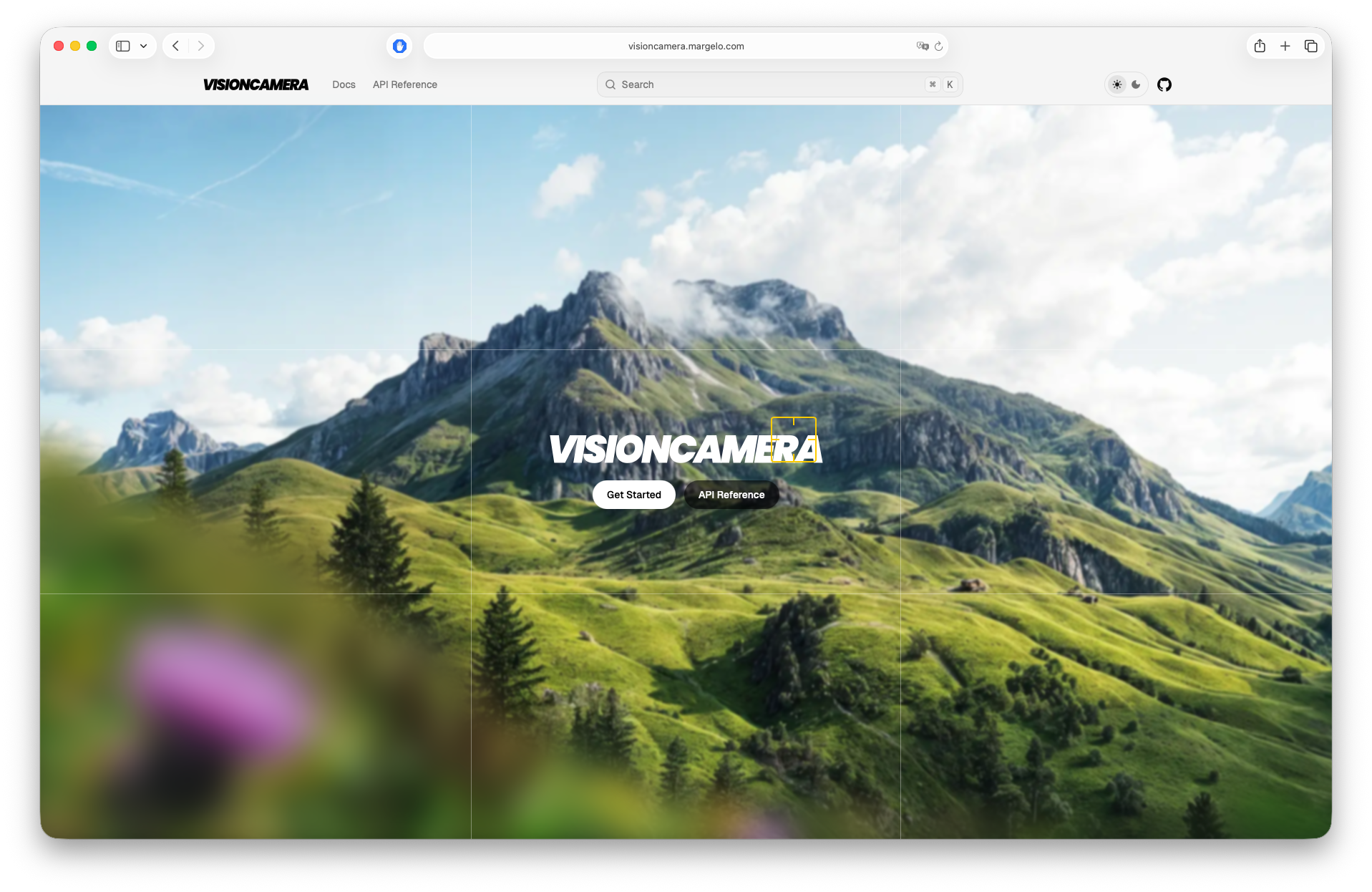
As the VisionCamera API surface has grown massively in V5, we've prioritized writing API docs on each public type exposed by VisionCamera to help developers navigate around the documentation more easily:
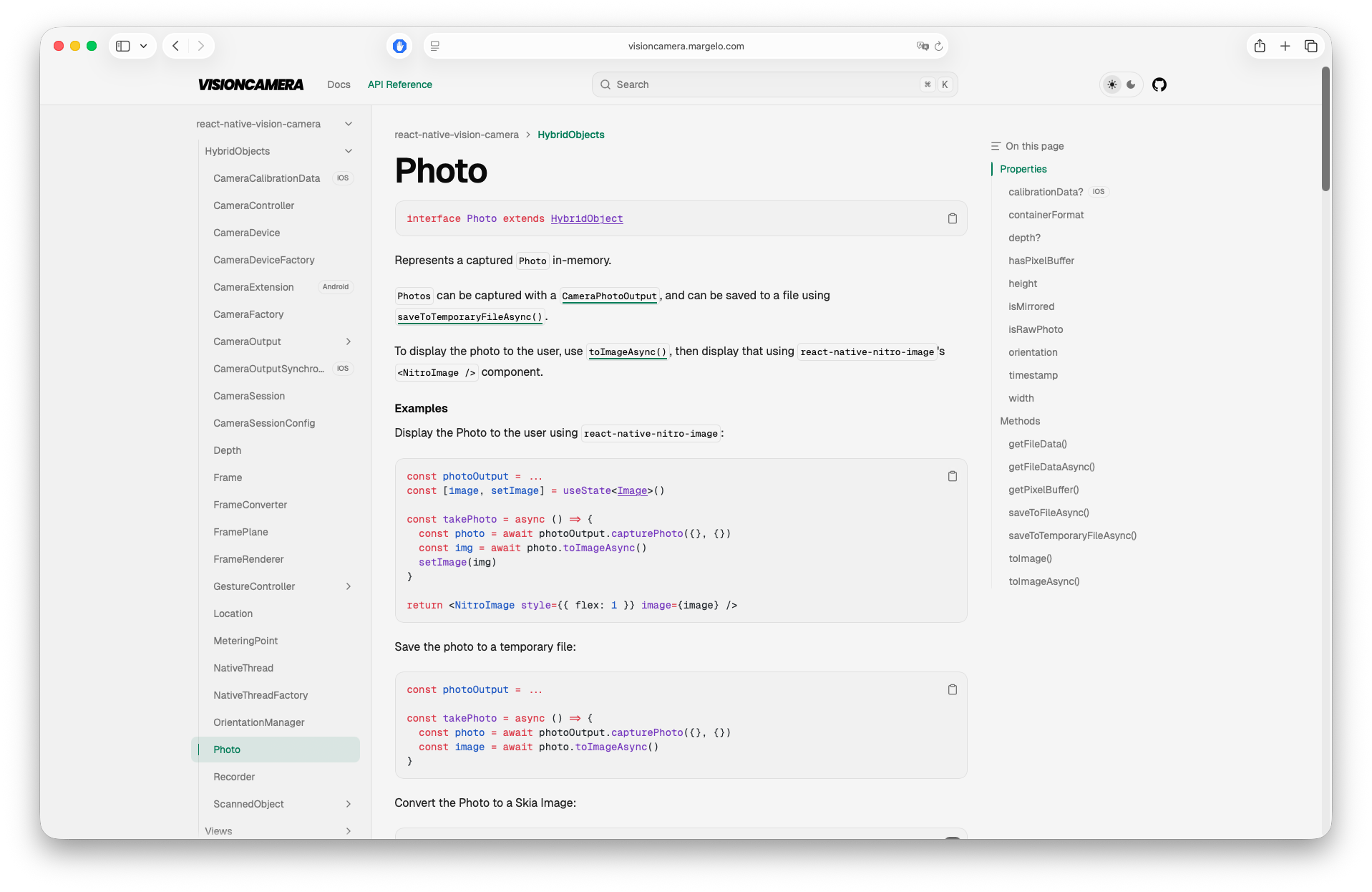
Manual AE/AF/AWB
For pro-photography apps, VisionCamera V5 now supports fully manual Exposure, Focus and White-Balance switches and knobs - for example, setFocusLocked(...) can be used to lock focus to a custom lens position between 0 (closest) and 1 (furthest):
const controller = ...
// Close Focus:
await controller.setFocusLocked(0.3)
// High Exposure
await controller.setExposureLocked(
  controller.minExposureDuration,
  controller.maxISO
)
// "Red" WhiteBalance look
await controller.setWhiteBalanceLocked({
  redGain: 1.0,
  greenGain: 0.1,
  blueGain: 0.1,
})
Full Video Dynamic Ranges API (SDR, HDR, Log)
While previously only a simple videoHdr switch was exposed, VisionCamera V5 now exposes a full DynamicRange API - this allows you to configure the Camera to stream in HLG_BT2020, or appleLog.
Use the Constraints API to configure your target dynamic range:
function App() {
  return (
    <Camera
      style={StyleSheet.absoluteFill}
      device="back"
      constraints={[
        {
          videoDynamicRange: {
            bitDepth: 'hdr-10-bit',
            colorSpace: 'hlg-bt2020',
            colorRange: 'full'
          }
        }
      ]}
    />
  )
}
More focus() control
Focus got more customizable: developers can now configure the following options on a focusTo(...) call:
modes={...}: Configures whichMeteringModes will perform a metering operation - for example, to only adjust exposure but not focus or white-balance, pass only'AE'.adaptiveness={...}: Affects how scene changes react to the focused state - for example,'locked'keeps the values that have been focused to in focus, even if the scene changes - e.g. if the user taps on a football field and a person walks through the Camera, the football field will stay in focus with'locked', and the person will be focused to briefly with'continuous'.autoResetAfter={...}: Configures when to reset the focus operation, in seconds. By default, after5seconds the focused point will be reset to continuously auto-focus again.responsiveness={...}: Configures how fast to focus to the tapped point - e.g.'snappy'might be suitable for photo capture as it's fast, and'steady'is suitable for video capture as it's less visually intrusive.
const onViewTapped = async (tapX: number, tapY: number) => {
  const point = previewViewRef.createMeteringPoint(tapX, tapY)
  await controller.focusTo(point, {
    modes: ['AE'],
    adaptiveness: 'locked',
    autoResetAfter: null,
    responsiveness: 'snappy'
  })
}
Focus now works in Skia
Also, as focus operations now take MeteringPoints, focusTo(...) now also works in <SkiaCamera />! 🎉
Coordinate System Conversions
VisionCamera V5 now provides first-class support for converting between Preview-, Frame- and Camera- coordinates.
For example, when scanning a QR/Barcode with a Barcode Scanner Frame Processor Plugin, you might want to display an outline around the Barcode to provide the user with visual feedback - for this you'd need to convert from Frame-coordinates to Preview-coordinates:
const barcodeScanner = ...
const preview = ...
const frameOutput = useFrameOutput({
  onFrame(frame) {
    'worklet'
    const barcodes = barcodeScanner.scan(frame)
    for (const barcode of barcodes) {
      const framePoint = { x: barcode.x, y: barcode.y }
      const cameraPoint = frame.convertFramePointToCameraPoint(framePoint)
      const previewPoint = preview.convertCameraPointToViewPoint(cameraPoint)
      scheduleOnRN(setBarcodePoint, previewPoint)
    }
    frame.dispose()
  }
})
See Coordinate Systems for more information.
A new integrated QR/Barcode Scanner
Previously (in V4 or below), the QR/Barcode Scanner used Apple's integrated AVCaptureMetadataOutput on iOS, and MLKit's third-party Barcode Scanning library on Android.
Unfortunately this came with some discrepancies, as some Barcode formats were supported on iOS but not on Android, and vice versa. Detection speed or accuracy also often varied between the platforms.
In VisionCamera V5, the Barcode Scanner now uses the MLKit third-party Barcode Scanning library on both iOS and Android, ensuring consistent behavior and performance on both platforms. To avoid adding a dependency on MLKit for every user (even if you are not using QR/Barcode Scanning), the Barcode Scanner has been extracted from VisionCamera core, and is now shipped under react-native-vision-camera-barcode-scanner:
function App() {
  return (
    <CodeScanner
      isActive={true}
      barcodeFormats={['all-formats']}
      onBarcodeScanned={(barcodes) => {
        console.log(`Scanned ${barcodes.length} barcodes!`)
      }}
    />
  )
}
New Native Object Output
In addition to the Barcode Scanner library, VisionCamera Core contains a new CameraObjectOutput, which allows detecting QR/Barcodes, as well as Human Faces, Animals, or other objects using AVCaptureMetadataOutput (iOS only):
function App() {
  const objectOutput = useObjectOutput({
    types: ['qr', 'face', 'human-body'],
    onObjectsScanned(objects) {
      console.log(`Scanned ${objects.length} objects!`)
    }
  })

  return (
    <Camera
      style={StyleSheet.absoluteFill}
      isActive={true}
      device="back"
      outputs={[objectOutput]}
    />
  )
}
Depth Data Streaming
In addition to Frame Processors, VisionCamera V5 now also supports Depth Frame Processors.
Pro-phones with LiDAR-, Time-of-Flight- or Infrared-sensors can stream depth-* frames, and phones with virtual Camera Devices (e.g. Dual- or Triple-Camera) can often stream disparity-* frames.
const depthOutput = useDepthOutput({
  onDepth(depth) {
    'worklet'
    const data = depth.getDepthData()
    // ...Analyze depth data
    depth.dispose()
  }
})
RAW Capture
Pro-photography apps often allow capturing RAW Photos, to color-grade or edit later. VisionCamera V5 now supports capturing RAW Photos using Adobe DNG or Apple ProRAW formats.
Imperative API
VisionCamera V5 is now built with an imperative API, which is used under the hood when you render a <Camera />.
For advanced use-cases (such as Multi-Cam) or granular control, you can use the imperative API yourself:
import {
  VisionCamera,
  getDefaultCameraDevice
} from 'react-native-vision-camera'

const session = await VisionCamera.createCameraSession(false)
const device = getDefaultCameraDevice('back')
const photoOutput = VisionCamera.createPhotoOutput({})
await session.configure([
  {
    input: device,
    outputs: [
      { output: photoOutput, mirrorMode: 'off' }
    ],
    constraints: []
  }
])
await session.start()
Multi-Cam Camera Sessions
A Multi-Cam Camera Session is a CameraSession that streams from 2 or more CameraDevices to multiple Camera Outputs.
For example, you might want to capture content from both the 'front' and 'back' Camera at the same time while displaying both Previews Picture-in-Picture, then stitch the recordings together in post-processing.
Multi-Cam Camera Sessions are available via the Imperative API:
import {
  VisionCamera,
  getDefaultCameraDevice
} from 'react-native-vision-camera'

if (VisionCamera.supportsMultiCamSessions) {
  const session = await VisionCamera.createCameraSession(true)
  const back = getDefaultCameraDevice('back')
  const front = getDefaultCameraDevice('front')
  const backPhotoOutput = VisionCamera.createPhotoOutput({})
  const frontPhotoOutput = VisionCamera.createPhotoOutput({})
  await session.configure([
    {
      input: back,
      outputs: [
        { output: backPhotoOutput, mirrorMode: 'off' }
      ],
      constraints: []
    },
    {
      input: front,
      outputs: [
        { output: frontPhotoOutput, mirrorMode: 'on' }
      ],
      constraints: []
    }
  ])
  await session.start()
}
The new GPU-accelerated Resizer
In addition to faster Frame Processors, VisionCamera V5 introduces a new package: react-native-vision-camera-resizer.
The VisionCamera Resizer is a GPU-accelerated compute shader written in Metal on iOS and Vulkan on Android to speed up Frame resizing, YUV -> RGB conversion, pixel packing, data type conversions, and cropping for ML pipelines, like ONNX, TFLite or more.
const { resizer } = useResizer({
  width: 192,
  height: 192,
  channelOrder: 'rgb',
  dataType: 'float32',
  scaleMode: 'cover',
  pixelLayout: 'planar',
})

const frameOutput = useFrameOutput({
  pixelFormat: 'yuv',
  onFrame(frame) {
    'worklet'
    if (resizer != null) {
      const resized = resizer.resize(frame)
      const buffer = resized.getPixelBuffer()
      // ...run ML inference with `buffer` as tensor input
      resized.dispose()
    }
    frame.dispose()
  }
})
We've benchmarked the GPU-accelerated Resizer against the CPU/SIMD-based vision-camera-resize-plugin, and measured a ~5x performance speedup.
Modularized packages
Instead of one large core package, VisionCamera V5 is now split across multiple smaller packages that act as "plugins":
- react-native-vision-camera: The core library, including Camera Sessions, the
<Camera />component, Photo-, Video-, Frame- and Depth- Outputs and more. - react-native-vision-camera-barcode-scanner: An MLKit Barcode Scanner for both iOS and Android. See "A new integrated QR/Barcode Scanner" for more information.
- react-native-vision-camera-location: A plugin for VisionCamera core to get a user
Location- this can be attached to captured Photos or Videos as EXIF or metadata tags. - react-native-vision-camera-resizer: A GPU-accelerated
Frameresizer. See "The new GPU-accelerated Resizer" for more information. - react-native-vision-camera-skia: A plugin to render a Camera preview with Skia, allowing for custom effects and shaders.
- react-native-vision-camera-worklets: A plugin to run JS Frame Processors using react-native-worklets. This is needed to use Frame Processors.
react-native-worklets
VisionCamera V5 now modularized the Frame Processor engine, decoupling it from a specific Worklets implementation. The default implementation shipped in react-native-vision-camera-worklets now uses react-native-worklets instead of react-native-worklets-core. We've worked together with the Software Mansion team to ensure Worklets works well for Frame Processing tasks. This means, you can now update Reanimated SharedValues within a Frame Processor to provide instant user feedback:
const faceDetector = ...
const boundingBox = useSharedValue<Rect | undefined>()
const frameOutput = useFrameOutput({
  pixelFormat: 'yuv',
  onFrame(frame) {
    'worklet'
    const face = faceDetector.scan(frame)
    boundingBox.value = face.boundingBox
    frame.dispose()
  }
})
Native Frame Processor Plugins are now Nitro Modules
As the Frame Processor runtime has been re-implemented from scratch, every Native Frame Processor Plugin is now just a Nitro Module - this provides performance improvements for Frame Processors, as well as a simpler, yet more powerful development process for Native Frame Processor Plugin authors.
First, all your Frame Processor Plugins are now fully typed - no more [String: Any?], no more maps, no more Any? return types - instead, your Native Frame Processor Plugins will make use of Nitro's Typing System for full type-safety on parameters and return types:
import { HybridObject } from 'react-native-nitro-modules'
import { Frame } from 'react-native-vision-camera'

type FaceDetectorMode = 'accurate' | 'fast'
interface Face {
  x: number
  y: number
}
interface FaceDetector extends HybridObject<{ ios: 'swift' }> {
  run(frame: Frame, mode: FaceDetectorMode): Face[]
}
See "Native Frame Processor Plugins" for more information about native plugins.
Extensible design with custom native CameraOutputs
At Margelo, we often implemented fully custom Camera solutions for our clients. Recently we built a fully custom HDR pipeline for a pro-photography app by using a Metal Compute Shader to fuse a bracketed capture sequence together into a single final Photo.
This required us to fork- or patch VisionCamera, decoupling us from the release cycles and preventing us (and our clients) from benefiting from future improvements.
As it became tedious to maintain such forks, we now made VisionCamera modular: Every CameraOutput natively conforms to a public protocol (NativeCameraOutput.swift / NativeCameraOutput.kt), which the Camera Session internally works with.
This public contract makes it possible for us (or you) to implement custom Camera Outputs in third-party code (such as in a custom Nitro Module), and later attach them to the existing VisionCamera Camera Session, without forking the library or patching anything:
class HybridMyCameraOutput: HybridCameraOutputSpec, NativeCameraOutput {
  ...
Then, in JS:
function App() {
  const myOutput = useMyOutput()
  return (
    <Camera
      style={StyleSheet.absoluteFill}
      isActive={true}
      device="back"
      outputs={[myOutput]}
    />
  )
}
As long as HybridMyCameraOutput conforms to the public NativeCameraOutput protocol, VisionCamera can internally attach it to the Camera and stream to it.
This would be the point to implement the custom bracketed Photo HDR fusion pipeline I mentioned earlier.
This concept also works with other types, such as NativeCameraDevice, NativeFrame, NativePhoto, NativeLocation and more.
Try VisionCamera V5
If you're building a React Native camera app, VisionCamera V5 is the release I would start with. The new Nitro foundation makes the core API faster and more extensible, and the new Constraints API, in-memory photos, depth data, RAW capture, Multi-Cam sessions, and modular plugins unlock workflows that used to be awkward or impossible before.
Install VisionCamera V5 (and Nitro + NitroImage) today:
npm i react-native-nitro-modules react-native-nitro-image
npm i react-native-vision-camera@5
Start with the new docs, explore the API reference, and pick the packages you need. If you used V4 before, V5 is a much stronger foundation for whatever you want to build next.
Reach out to us over at margelo.com for custom Camera solutions or help with integrating VisionCamera V5!