Discord and Margelo had already solved many of the hardest challenges in migrating Discord's android app to React Native's New Architecture. But one obvious issue remained: animations felt terrible.
As one of Discord's engineering managers described it:
"The android app worked, but animations and transitions felt like a 2006 PowerPoint slideshow."
Since much of Discord's UI is powered by Reanimated v3, we knew the bottleneck had to be somewhere in how Reanimated interacted with the new architecture.
So what changed? In this post, we'll dive deep into Reanimated's internals, explore how Fabric's Shadow Tree works, and walk through the real performance issue we uncovered, plus the fix that brought animation smoothness back.
If you've never read or heard anything about React Native internals, the Shadow Tree, Shadow Nodes and related concepts, I highly recommend reading this 10-minute guide from React Native as a starting point: https://reactnative.dev/architecture/render-pipeline
How Reanimated Powers Animations
Reanimated currently provides three ways to run animations:
-
Layout Animations
-
CSS Transitions & Animations
-
shared value-driven animations using APIs like
useAnimatedStyle
I don't have hard data for this, but at the time of writing I'd argue that in most React Native production apps the usage is "shared value-driven animations" > layout animations > CSS animations (as this was the order in which they were released, shared value-driven animations animations have existed since v2).
Discord relied heavily on shared value-driven animations, so that's where we started digging.
How Reanimated Sends Updates from JavaScript to C++
The Reanimated core that powers these animations is written in C++. So how are animation updates passed from your react components to C++?
Let's understand what's happening under the hood in the JavaScript realm through an example. Imagine you have this code:
function MyComp() {
  const opacity = useSharedValue(0)

  const styles = useAnimatedStyle(() => ({
    opacity: opacity.value
  }))

  useEffect(() => {
    opacity.value = withTiming(1, {
      duration: 500
    })
  }, [])
}
What Actually Drives a Reanimated Animation
Quiz time! Which of these three Reanimated APIs/functions is the one continuously driving the animation:
a) useSharedValue?
b) useAnimatedStyle?
c) withTiming?
Interestingly, none of them directly drive the animation. We're actually using a fourth, less obvious API here when we call opacity.value =
Looking at what useSharedValue returns, we can see that it internally creates something called a mutable :
makeMutable has two paths: either the mutable is created on the UI runtime, or it is created somewhere else, like the normal React Native JavaScript runtime.
In our case, makeMutable is called on the RN runtime, so Reanimated takes the second path and schedules the update onto the UI runtime.
This is an important detail: setting a shared value from JS is not really a synchronous write, even though opacity.value = ... looks like one. Under the hood, Reanimated is handing that work off to another runtime.
Once the update reaches the UI runtime, Reanimated calls valueSetter(...):
One interesting thing here is that the incoming value may actually be a function. In other words, withTiming(...) does not just return a number.
From animation definition function, Reanimated creates an animation object and advances it frame by frame.
The main loop is Reanimated's own requestAnimationFrame implementation running on the UI runtime (not the usual React Native JS requestAnimationFrame). Under the hood this is backed by Android's Choreographer and iOS's CADisplayLink:
So the loop is roughly:
- schedule the shared value update onto the UI runtime
- create the animation there
- advance it every frame using Reanimated's UI-thread
requestAnimationFrame - write the latest value back to the shared value
How Shared Values Reach Your Components
Once the shared value changes, Reanimated still needs to push that new value to the actual mounted view.
This is where useAnimatedStyle comes in. It creates a mapper, which is Reanimated's way of saying: "when one of these shared values changes, recompute the style".
But there's a second question too: which views should receive that style?
That part is handled by createAnimatedComponent. Components like Animated.View are really just React Native components wrapped by createAnimatedComponent:
Inside that wrapper, Reanimated registers the mounted view with the animated style so it knows where future updates should go:
Internally, Reanimated stores those targets as "viewDescriptors", which include the view's tag and shadow node. That is what lets one animated style be applied to one or even multiple mounted views.
So there are really two pieces working together here:
- the mapper answers: "when a shared value changes, what is the next style?"
- the view descriptors answer: "which mounted native views should receive it?"
When the mapper runs, it computes the next animated props and eventually calls updateProps(...), which batches them before flushing to global._updateProps(...):
That is the key handoff from the JavaScript side into Reanimated's native C++ implementation, as global._updateProps is a C++ function defined via JSI.
So the JavaScript-side pipeline looks something like this:
useSharedValuecreates a mutable on the JS thread- assigning
.valueschedules work onto the UI runtime withTimingprovides the animation definition- Reanimated advances it with its own UI-thread
requestAnimationFrame useAnimatedStylereacts to shared value changes via a mappercreateAnimatedComponentregisters which mounted views should receive those updates- the resulting props are batched and sent to native through
global._updateProps(...)
Up until this point this was mostly internal TypeScript implementation details, and I assume most of you are fairly comfortable writing TS code. Now let's move into the more interesting C++ internals and learn something new about how React Native New Architecture works internally.
I promise: no C++ experience needed to follow along! This is also the place where we will learn where and why the performance regressed on new arch :)
Crossing Into Native: The C++ Runtime
If we search for the global._updateProps(...) function we saw in javascript we find it here in some C++ code:
Here it is installing some C++ functions into the global object of the JavaScript runtime, so that it can be accessed from JavaScript code. As you can see the function receives a uiRuntime (first argument). react-native-worklets creates a new JavaScript runtime on the UI thread for reanimated (to which we inject those functions).
These methods on global will only be available on the UI runtime, not on the JS runtime where the rest of your react-native app runs (aka. only in "worklet" functions).
The actual C++ updateProps function is defined in the ReanimatedModuleProxy which is one of the core pieces of Reanimated's C++ architecture.
If you're new to C++, the syntax may look unfamiliar, but just focus on the semantical sense here. We can see that we call animatedPropsRegistry_->update(rt, operations, timestamp);.
This probably means that in C++ there is some kind of animatedPropsRegistry and that keeps track of the updates we have to perform!
What this also means is that even when our shared value updated on the UI thread, the animated style update is not applied immediately. The update is just put in this registry, that's all for now.
Our animated updates on new arch actually get applied by a function in ReanimatedModuleProxy called performOperations(). On old arch, there was a different code path. We will focus on this new code path since this is where the culprit lies to the performance issues we were seeing.
There are two main places from where this functions is invoked:
-
On the native side reanimated is using the
requestAnimationFrame"native equivalent" which is subscribing to the Choreographer on android and CADisplayLink on iOS. Those are basically ways to allow you to run a function at the refresh rate of your phone's display (link to reanimated code). So on every new frameperformOperations()will be called. -
When a new native event happens. For example this could be a scroll event or a touch event for one of your gesture handlers. If you have a
useAnimatedScrollHandlerreanimated will intercept the scroll event that's happening on the UI thread, process your animated scroll handlers, and callperformOperations()so that your gesture drives the animation synchronously!
performOperations() basically does two things:
- it collects all updates to be performed. This includes updates from e.g.
useAnimatedStylebut also from css animations & transitions.
- It applies those updates synchronously! How does it do that? It's using one of react-native's Shadow Tree APIs that we are going to take a look at, it's called
shadowTree.commit(...)
The code for applying the updates is here:
-
On the first line we see the
shadowTree.commit(function call. It receives a callback as parameter. That callback receives theoldRootShadowNode -
Reanimated calls
cloneShadowTreeWithNewProps(oldRootShadowNode, propsMap);. We will look at that in detail in a second, but the name is fairly self-explanatory.propsMapis the "shadowNode to: propsToUpdate" map that contains our animated updates! -
It returns the new
rootNode
So reanimated is basically applying our props updates on top of the previous/current shadow tree (where "shadow tree" is really the current root node).
Understanding Fabric's Shadow Tree
What is the shadow tree and how does react render its updates with react-native in general?
For those having a hard time imagining this "Shadow Tree" and its "root node" take a look at this image from the react-native docs:
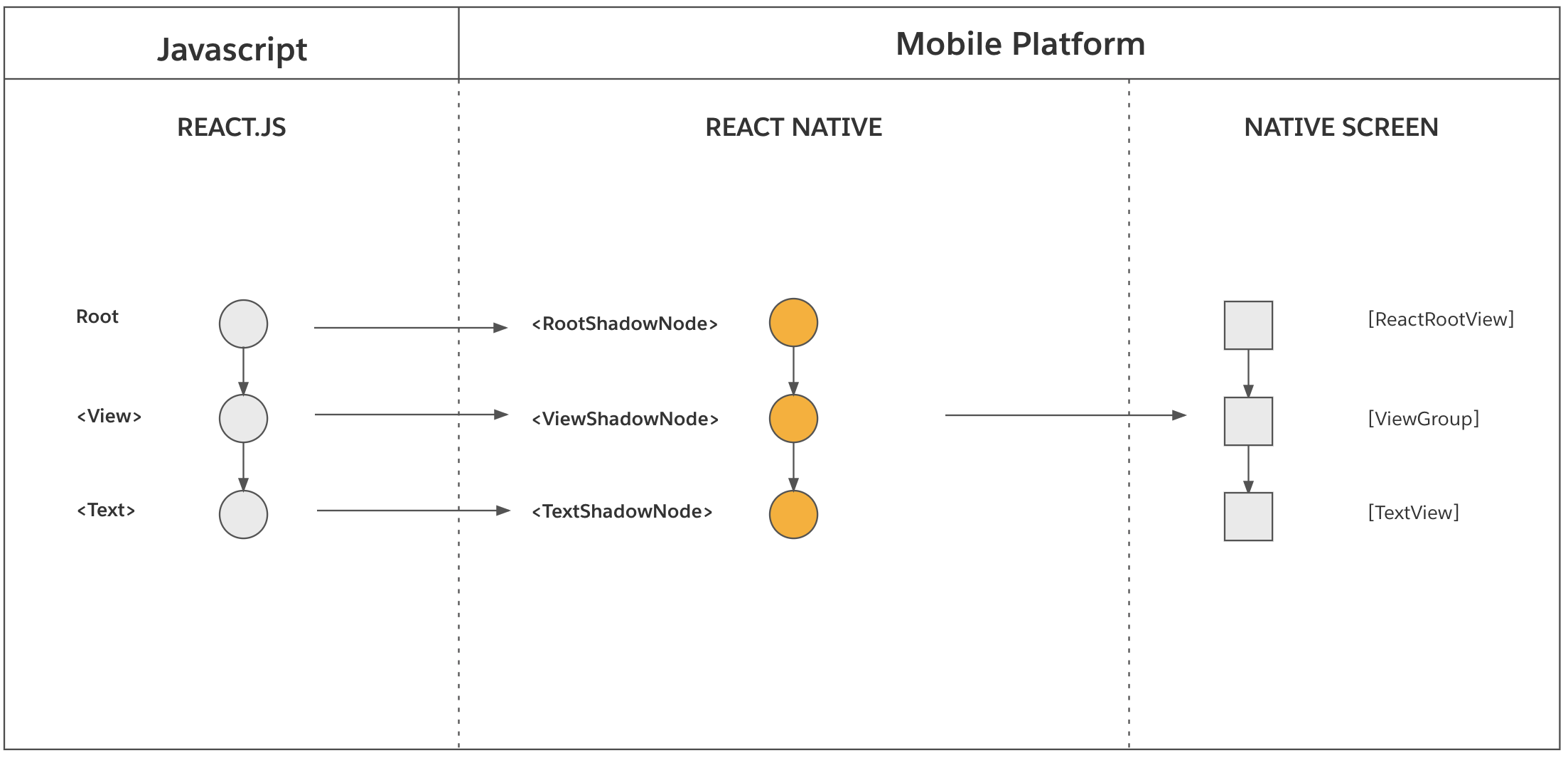
For each host component, react-native has on the c++ a Shadow Node, and those shadow nodes are organized under a "RootShadowNode". This tree structure we refer to as "Shadow Tree" :)
As you can see from the image, the shadow tree is what will be used later to finally mount the native views to the screen.
Let's imagine for a second that on the native side you'd simply update the native TextView manually and change the text's color. This might work for a moment, however, once you push a new update from react, this native change would be lost! Why? Because fabric is creating your native view hierarchy from the shadow tree. And you never communicated your text color update to the shadow tree.
That means if you want to change the native view (hierarchy) you have to communicate the update through the shadow tree, it's what keeps the native side in sync with react!
One important Fabric detail: in the New Architecture, ShadowNodes are immutable snapshots. Reanimated cannot simply mutate an existing ShadowNode in-place like parts of the old architecture could. Instead, any update has to create a new revision of the tree: clone the affected ShadowNodes, merge the new props into those clones, and then commit the new root back to the Shadow Tree.
Why All Updates Go Through commit(...)
In that same vein, if react wants to perform an update (e.g. you updated a useState() ), react-native will also call shadowTree.commit(...) to perform this react update. This happens here:
In javascript react finishes your update and calls a method called completeRoot:
On the react-native side we find this function in c++, as its also a JSI function:
This will call into uiManager->completeSurface(
Remember how Reanimated passed mountSynchronously = true ? A react update is actually mounted asynchronously, interesting, right? If you want to deep dive into understanding the full react-native rendering pipeline you may find my talk on that topic useful.
And uiManager->completeSurface(...) will then actually call shadowTree.commit(...) :
Congrats, you just learned about the main mechanism to update the react-native shadow tree! Not only Reanimated is using this mechanism, but also for example unistyles/uniwind does!
The Real Performance Bottleneck
But lets get back to Reanimated and the performance problem we were trying to fix!
I can already tease you that this line was somewhat the culprit:
It is basically a recursive algorithm that will take the shadow nodes we need to update and then traverse over the existing shadow tree, and clones only the shadow nodes we need to update while merging our animated props on top of it:
Now, what was the performance issue exactly about with this? Was the algorithm not fast enough?
The algorithm itself was reasonable, given the data structure of the shadow tree. The problem was the amount of shadow nodes we had to update.
For example we saw that animating just one single view (on a screen with a lot of other animated components) in cloneShadowTreeWithNewProps we were cloning hundreds of shadow nodes. Even though only one view was animating. At that scale, the function became expensive
Additionally, this cloneShadowTreeWithNewProps is not only called when we run our animations. It also has to be called when react is doing its updates to the shadow tree. Why? Coming back to the graphic from the RN docs one more time:
What Reanimated did was to change the react-native Shadow Tree directly, which would correctly update the native screen. But it never updated the react tree! For example, with Reanimated we animate the background color, but react would push a revision with an old stale value and the animated bg color would flip back to its previous state (the stale one from react)!
To prevent this, Reanimated also runs cloneShadowTreeWithNewProps for each react commit. Please meet another react-native fabric API, the commit hook.
Every time we make a commit to the shadow tree, before it gets applied, we can intercept that update with a commit hook, kind of like a middleware. And reanimated does that here, to always apply the latest state of your animated props on top of the tree:
In this video I disabled reanimated's commit hook:
ReanimatedCommitHook::ReanimatedCommitHook(...) {
//  👀 Disabling the installment of the commit hook
//  uiManager_->registerCommitHook(*this);
}
and look what happens:
- The first box's
backgroundColoris animated by reanimated - The second is changed by react
When we change the second box, the first box is loosing the change by reanimated as react is pushing its stale value!
So the performance problem really was:
-
imagine you launch into your app and you have a list of items
-
those items are made of components which have their individual
useAnimatedStyles, maybe to handle some entering animations, or react to some shared value that might change later -
those component nodes are stored in Reanimated props registry (and only evicted if the components unmount, but we are actively on that screen)
-
their animations are all done
-
now you animate another view (say a notification bell in the nav bar)
-
we now have to clone and perform the work of traversing and merging props for all the nodes in the props registry, although 99% of them don't animate in this moment.
In this recording you can see that I log the amount of nodes we currently have to clone.
The example renders a list of 100 Animated.View . You can see that the cloneShadowTreeWithNewProps has to clone all those 100 nodes. Then, we change the react state of one other view to change the size, and look at the logs: We still have to clone the props for all 100 nodes! You can also see the UI FPS drop a bit here
Why Even Opacity Became Expensive
Additionally, there was another performance problem. In our example we only wanted to animate the opacity, right?
Opacity does not affect layout. The opacity won't change the view's size or paddings, or position. However, when you call shadowTree.commit(…) to e.g. just update the opacity, there is a high chance fabric will perform a layout pass (especially when animating text-/inputs).
This may or may not be expensive to run. However, for updating some props that do not impact the layout, doing a layout pass 60 times per second is just a waste of computation.
There is actually a fast-path which can update those non-layout related props, without going through shadowTree.commit() but updates the native views directly.
However, bypassing the Shadow Tree is a tradeoff. This fast path can make non-layout prop updates much cheaper, but because those updates do not go through the normal Shadow Tree commit flow, they can interact badly with parts of React Native that rely on the Shadow Tree as the source of truth. In practice, this caused correctness issues with Pressable and the touch system in general, so the fast path had to be disabled again. Correct behavior matters more than raw speed here:
The Fix That Restored Smoothness
So, after understanding all of these problems, what is a good solution that fixes the main performance issues, but without breaking parts of the app?
The solution we implemented for discord was to:
-
Sync updates back to React once an animation was done. This way we avoid inconsistency issues with react and the shadow tree
-
When we know a node is synced back and synced with React and the Shadow Tree, we can remove it from the animated props registry early on. This way we don't keep nodes in there that are currently not animated. This was the main performance fix.
-
Given that we have (1) in place we were able to add back the fast path to update non-layout props synchronously
We discussed those issues with Software Mansion and since then they were mostly upstreamed!
These two performance improvements are, as of today, behind two feature flags that you can enable in your app to make it faster (always benchmark before and after ofc!).
The first one is FORCE_REACT_RENDER_FOR_SETTLED_ANIMATIONS (which is turned on by default since v4.3.0), which enables syncing back to react, which will clean the nodes from the animated props registry, which was discord's main performance problem.
Coming back to the example, you can see how reanimated is now removing the nodes it doesn’t need any longer. The FPS drop is not as bad anymore (on this low-end device the FPS always drop by ~2 FPS when you click on anything):
The second one is ANDROID_SYNCHRONOUSLY_UPDATE_UI_PROPS and IOS_SYNCHRONOUSLY_UPDATE_UI_PROPS which enables the fast path, which the reanimated team added back!
You can see that in ReanimatedModuleProxy.cpp performOperations() before running the layout-prop updates that need shadowTree.commit() (width, padding, etc) there is a check to apply synchronous updates right away:
This is using another react-native API on the Fabric UIManager called:
As mentioned above, ANDROID_SYNCHRONOUSLY_UPDATE_UI_PROPS bypasses the shadow tree which can cause issues. However, with FORCE_REACT_RENDER_FOR_SETTLED_ANIMATIONS it should be fine for most cases, as the state is synced back to react/the shadow tree.
Real-World Results
With those changes the jank frame rate on the discord new arch android app was reduced by 26%, bringing it back to previous levels!
Final Words
Performance regressions during architecture migrations are rarely caused by a single slow function. More often, they emerge from subtle interactions between systems.
In this case, solving Discord's animation issues required understanding how Reanimated, Fabric, Shadow Trees, commit hooks, and rendering pipelines worked closely together.
What's Next
Software Mansion worked together with Meta on pushing a lot of this code to React Native core, it's called the "shared animation backend", which is available since v0.85 behind a feature flag: https://reactnative.dev/blog/2026/04/07/react-native-0.85#new-animation-backend
In the future Reanimated's internals will shift to use this implementation, which should further improve animation performance across React Native apps.